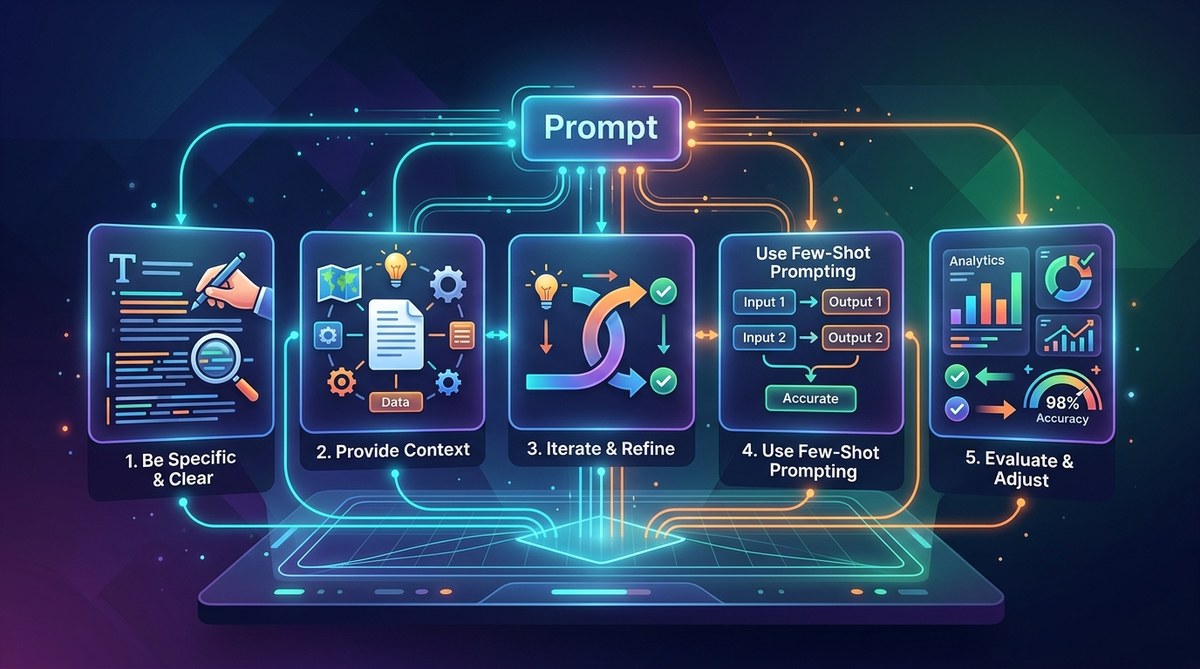
Getting precise, reliable answers from GPT-5 or ChatGPT isn’t luck. It’s craft. You can feed the model a vague one-liner and get a decent response, but a structured prompt yields results that are often dramatically better. Whether you’re building an AI agent, generating marketing copy, or conducting research, small tweaks to your input can cut errors in half. The difference between a mediocre reply and a sharp, usable one comes down to how you frame the task. Let’s look at five concrete ways to optimize GPT prompts for higher accuracy.
To optimize GPT prompts realistically, you need to supply clear context, use examples, assign a persona, break complex requests into steps, and iterate on output. These five methods reduce ambiguity and guide the model toward the exact answer you want. Start applying them today and watch accuracy climb.
Why Prompt Accuracy Matters More Than Ever
In 2026, GPT-5 and similar models are incredibly powerful. They can write code, draft contracts, and even simulate nuanced conversations. But that power comes with a catch: if your prompt is fuzzy, the model has to guess what you really want. A guess might be okay for a casual chat, but unacceptable for production code or a client report. Research from OpenAI shows that well structured prompts can improve task completion rates by 40% or more. The cost of a bad prompt is wasted time, tokens, and trust.
The good news: you don’t need a PhD in machine learning to fix it. These five optimizations are practical and immediate. They work with GPT-5, any ChatGPT version, and many other large language models.
1. Provide Clear Context and Constraints
When you ask a question without background, the model fills in the blanks with its own assumptions. Those assumptions might be wrong. For example:
Bad prompt: “Write a summary of this article.”
That could produce a 200-word summary or a two-sentence blurb. It might include opinions or miss key data. Instead, structure your request:
Better prompt: “You are a technical editor. Summarize the following 1,500-word article about renewable energy in exactly three bullet points. Focus only on cost comparisons between solar and wind. Omit any political commentary.”
Now the model knows:
– Its role (technical editor)
– The output format (three bullet points)
– The focus (cost comparisons, no politics)
This kind of specificity is what developers and content creators need to trust the output.
Common Mistakes When Setting Context
| Mistake | Why It Hurts | How to Fix |
|---|---|---|
| No role assigned | Model defaults to generic tone | Specify a persona |
| Unclear output length | You get rambling or terse replies | Give word or character limit |
| Missing focus area | Response covers irrelevant details | List topics to include and exclude |
| Overly broad question | Model guesses the angle | Narrow down with a single objective |
Using a table like this can help you audit your own prompts before hitting send.
2. Use Examples and Few-Shot Prompting
One of the most reliable ways to optimize GPT prompts is to show, not just tell. The model learns from examples. If you want a specific style of answer, provide a couple of good (or bad) samples.
Few-shot example:
Prompt:
“Translate these product descriptions from English to Spanish. Keep them under 30 words and use a casual tone.
Example 1:
English: Our new running shoe is designed for trail runners who need grip and comfort.
Spanish: Nuestra zapatilla de running nueva está diseñada para corredores de montaña que necesitan agarre y comodidad.
Now translate this:
English: This insulated water bottle keeps drinks cold for 24 hours, perfect for long hikes.”
The model will mimic the style and length of the example. You can also include a “bad example” to show what to avoid. This technique works especially well for code generation, data extraction, and creative tasks.
For more advanced usage, see our guide on mastering prompt engineering for AI success. It covers how to build few-shot prompts for complex agent tasks.
3. Set an Explicit Persona and Tone
A persona acts like a filter for the model’s default voice. If you don’t set one, GPT tends to be neutral and sometimes verbose. By assigning a role, you guide the model into a consistent style.
Without persona: “Explain machine learning bias.”
With persona: “You are a professor teaching a college freshman class. Use simple analogies and keep each paragraph under four sentences. Explain machine learning bias.”
The result is clearer, more focused, and easier for a non-technical audience to grasp. For researchers and developers, you might use a “technical lead” persona that expects precision and shorthand. For content creators, a “copywriter” persona aligns with brand voice.
This technique is part of how to design effective prompts for next-generation AI applications. The principle holds across models.
4. Break Down Complex Tasks into Steps
Large language models struggle with multi-step instructions if they’re crammed into one paragraph. When you ask for a whole report or a piece of code that does ten things, the model may skip steps or combine them incorrectly. The fix: use step-by-step prompting or chain-of-thought reasoning.
Example – good vs. bad:
Bad (all in one): “Write a Python function that fetches weather data from an API, parses the JSON, and returns only the temperature and humidity, then logs errors to a file.”
Better (broken into steps):
“Step 1: Write a Python function that calls the OpenWeather API for a given city. Use the requests library.
Step 2: Inside the function, parse the JSON response and extract the ‘temp’ and ‘humidity’ fields.
Step 3: Add error handling: if the API returns a non-200 status, log the error to ‘weather.log’ and return None.
Step 4: Combine all three steps into one clean function.”
This approach reduces hallucinations and logical errors. It works for any domain, from data analysis to email drafting.
Expert advice: “When you break a task into steps, you also make it easier to tweak one part without rewriting the whole prompt. Always test each step separately before merging.” – Senior AI engineer at a Fortune 500 company.
For a deeper look, check out innovative prompt strategies to accelerate AI development. It includes templates for chaining steps.
5. Iterate and Refine Based on Output
No prompt is perfect on the first try. The best prompt engineers treat each output as feedback. After you get a response, evaluate it for accuracy, tone, and completeness. Then adjust the prompt and try again.
A simple iteration loop:
1. Write initial prompt.
2. Run it three times (to check consistency).
3. Identify common errors (e.g., missing details, wrong format).
4. Update the prompt to fix those errors.
5. Repeat until output matches your standard.
This process works for any use case. For example, if GPT-5 keeps adding disclaimers you don’t want, add “Do not include any legal disclaimers.” If it uses technical jargon that your audience won’t understand, add “Explain in plain English.”
Many developers automate this loop using APIs. For a complete workflow, see how to leverage prompt engineering for maximum AI efficiency. It covers how to test prompts at scale.
A Handy Reference: Techniques and Pitfalls
Here is a markdown table summarizing the five techniques and frequent errors:
| Technique | Best For | Common Pitfall |
|---|---|---|
| Clear context & constraints | Data extraction, reports | Forgetting to specify output format |
| Few-shot examples | Translation, code, style mimicry | Using too many examples (stick to 2-3) |
| Persona & tone | Content, customer support | Choosing an irrelevant persona |
| Step-by-step breakdown | Complex logic, multi-output | Making steps too vague |
| Iterative refinement | Any task where quality varies | Stopping after one iteration |
Putting These Techniques Into Practice
You can apply all five techniques together for maximum effect. Here is a bulleted checklist to use before you send any prompt:
- Have you stated the desired role or persona?
- Did you include any constraints (length, format, tone)?
- Are there examples that illustrate the expected output?
- Is the task broken into clear steps if it is complex?
- Will you check the output and refine if needed?
Using this checklist will naturally optimize GPT prompts and reduce the back-and-forth. Over time, it becomes second nature.
For more on turning these methods into production-ready systems, read how to build custom AI agents for your business in 2026. It shows how to package these prompt techniques into reusable agent templates.
Keep Experimenting and Refining
The models keep improving, but the human side of prompting stays the same. Clarity and structure always win. Start by picking one of the five techniques and applying it to your most common prompt today. You will notice the difference immediately. Then add the others one by one. Accuracy is not about memorizing a formula; it is about understanding what the model needs to succeed. Give it clear guidance, and it will return the favor.