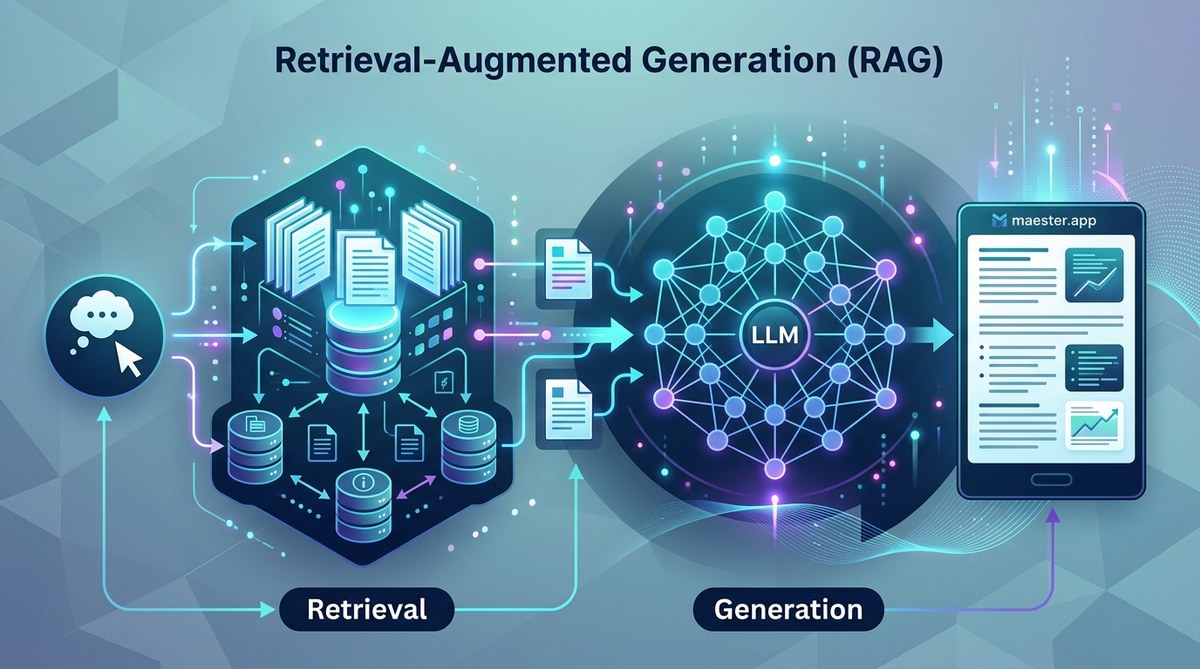
Retrieval-Augmented Generation (RAG) has become the standard way to make large language models useful without retraining them. Instead of hoping your model memorized the right answer, you give it a search engine. This approach reduces hallucinations and lets you control the knowledge base. In 2026, RAG is not just a nice to have. It is a core pattern in production AI systems. Whether you are building a customer support chatbot or a medical research assistant, you need to understand how to implement RAG properly.
RAG implementation combines a retrieval system with an LLM to ground answers in factual data. You need to choose a vector database, build a chunking strategy, design a retrieval pipeline, and craft effective prompts. Avoid common pitfalls like bad chunk size and missing re-ranking. This guide walks through each step with examples you can use today.
What Is Retrieval-Augmented Generation and Why It Matters Now
RAG couples a retriever with a generator. The retriever searches a knowledge base for relevant documents. The generator (usually an LLM) reads those documents and writes an answer. This keeps the model from making things up. In the last two years, the tech has matured. Frameworks like LangChain and LlamaIndex have added stable pipelines. Vector databases like Pinecone, Weaviate, and Chroma have made indexing trivial. But the real leap in 2026 is quality: better embedding models, smarter chunk overlapping, and reranking are now table stakes.
If your team is building an AI application that needs to answer questions about your own data, RAG is the safest path. It beats fine tuning for most use cases because you can update the knowledge base without retraining. You can also combine it with advanced use cases to handle complex queries.
Core Components of a RAG Pipeline
Before writing code, you need to understand the pieces.
- Embedding Model: Converts text into vectors. Used for both indexing and querying. In 2026, your best bet is a model optimized for your domain. General models like
text-embedding-3-smallwork, but domain specific ones give better recall. - Vector Database: Stores embeddings and runs similarity search. Options include open source (Chroma, Qdrant) and managed (Pinecone, Weaviate). Choose based on scale and latency needs.
- Document Store: This is where your raw text lives. It could be PDFs, internal wikis, or a database. You will chunk and embed these documents.
- Chunking Strategy: How you split documents. Too small, you lose context. Too large, you retrieve noisy content. Overlap helps.
- Retriever: The logic that decides how many chunks to fetch and how to rank them. Usually uses cosine similarity, but hybrid search (vector + keyword) is better.
- Reranker: A second pass that re-scores retrieved chunks. Improves relevance significantly.
- Generator Prompt: The prompt that feeds chunks to the LLM. This is where you control formatting, citations, and guardrails.
A Step by Step RAG Implementation Plan
Let us walk through the actual implementation. I will use a fictional example: building a support bot for a SaaS product. The knowledge base is 500 help articles.
1. Prepare Your Documents
Start by collecting all source files. Clean them: remove headers, footers, and navigation text. If they are PDFs, extract text with a tool like PyMuPDF or Unstructured. If they are Markdown, keep the structure.
Chunk each document. A common starting point is 500 tokens with 50 token overlap. For support articles, you might use 300 tokens because answers are short. Experiment. You can use a recursive character text splitter from LangChain.
Store the chunks in a list with metadata: source URL, title, index number. This helps you trace answers back to the original.
2. Choose and Configure Your Embedding Model
For English documents, BAAI/bge-base-en-v1.5 is strong in 2026. Or use OpenAI’s text-embedding-3-small for ease. Embed each chunk and store the vectors. In your vector database, create a collection that matches the embedding dimension. Add metadata to each vector so you can filter later (e.g., by product version).
3. Build the Index
Insert the vectors into your database. In Chronos, the command is straightforward:
collection.add(embeddings=embeddings, metadatas=metadatas, ids=ids)
For Pinecone, you use upsert. If you are working at scale, batch in groups of 100-200 to avoid rate limits.
4. Create the Retrieval Pipeline
When a user asks a question, embed the query with the same embedding model. Perform a similarity search. Return the top K chunks (start with K=5). For better results, combine with keyword search. This is called hybrid search. Many vector databases now support it natively.
After retrieving, run a reranker like Cohere Rerank or BGE Reranker. This step reorders the chunks so the most helpful ones come first. In one test at Maester, reranking lifted accuracy from 64% to 82% on internal benchmarks.
5. Craft the Generator Prompt
Now you feed the retrieved chunks into your LLM prompt. The prompt should include:
- The user’s question
- The top 3-5 chunks (after reranking)
- Instructions to answer only from the provided context
- If the context is irrelevant, say “I don’t know”
- Optionally ask for citations
Here is a minimal prompt template:
You are a support bot. Use the following context to answer the user's question. If the context does not contain the answer, say "I cannot find that information." Provide citations like [1], [2] etc.

Context:
[1] {chunk 1}
[2] {chunk 2}
...

Question: {user_question}

Answer:
Send this to your LLM (GPT-4o, Claude 3.5, or an open model). The result is a grounded answer.
Expert tip: Always add a guardrail prompt that instructs the model to not make up facts even if the context seems incomplete. This is one area where prompt engineering matters more than model size. You can learn more in Mastering Prompt Engineering for AI Success.
Common Implementation Mistakes and How to Fix Them
| Mistake | Symptom | Fix |
|---|---|---|
| Chunk size too small | Answers lack context, model jumps to conclusions | Increase chunk size to 500-1000 tokens. Use overlap of 10-20%. |
| No reranking | Relevant documents buried in retrieval list | Add a cross-encoder reranker. Even a cheap model helps. |
| Embedding model mismatch | Low retrieval recall | Use the same model for indexing and querying. Test with a small sample. |
| Ignoring metadata filtering | Retrieves irrelevant versions or topics | Include metadata (like date, product line) in your query filter. |
| Prompt too rigid or verbose | Model ignores context or repeats it | Keep prompt clear. Give minimal instructions. Test different phrasings. |
| Using only vector search | Misses exact matches for numbers or names | Enable hybrid search (dense + sparse). Many databases support hybrid_search=True. |
Advanced Optimization for Production RAG
Once your basic pipeline works, you need to push it further.
Chunking variations. Instead of fixed token size, try semantic chunking. Use a model to detect natural boundaries like paragraph breaks or section headers. This preserves meaning.
Query expansion. Before searching, rewrite the user query into multiple paraphrases. Combine the results. This catches phrasing mismatches.
Self query retriever. Let the LLM extract filters from the question (e.g., “last year” becomes date filter). Use those filters during retrieval.
Multi hop retrieval. For complex questions, loop: retrieve once, use initial answer to generate a second query, retrieve again. This is useful for troubleshooting guides that require multiple steps.
Feedback loops. Log user feedback. Track which answers were liked or disliked. Use that data to fine tune the reranker or adjust chunking. Over time, your system learns.
Implementing these optmizations can dramatically improve answer quality. For more ideas, check out 7 Prompt Engineering Techniques for Extraordinary AI Outputs.
Measuring Success in Your RAG System
You cannot improve what you do not measure. Set up evaluation metrics from day one.
- Retrieval recall: Out of all relevant chunks for a query, how many did your retriever return? Use human annotated test sets.
- Answer faithfulness: Does the LLM answer strictly from the provided chunks? Use an LLM as a judge to score adherence.
- End to end accuracy: For known ground truth, does the final answer match? This is your North Star.
In 2026, many teams use RAGAS (Retrieval Augmented Generation Assessment) or similar frameworks to automate evaluation. Run these metrics in a CI pipeline. Every time you change chunking or embedding, rerun the tests.
How to Scale RAG Without Breaking the Bank
RAG can get expensive if you re embed all documents for every query. A few tricks:
- Cache frequent queries and their results at the retrieval layer.
- Use cheaper embedding models for indexing (bge-small) and a more expensive one for query only if needed.
- Reduce the number of chunks sent to the LLM: after reranking, keep only top 2-3 chunks if the model supports longer context.
- Use open source LLMs for generation. Models like Llama 3.2 7B or Mistral are cost effective and perform well for RAG when prompted correctly.
You can read more about How to Build Custom AI Agents for Your Business in 2026 for patterns that combine RAG with agentic workflows.
Putting It All Together: Your First Production RAG
You now have a complete mental model. Start with a small dataset. Build the pipeline end to end in a notebook. Test with 20 questions. If the answers are good, containerize it. Add logging. Put it behind an API. Then iterate.
RAG implementation is not a one time task. It is a living system. As your data changes, your embeddings may drift. As user language evolves, your prompt may need tweaks. That is normal. The framework here gives you a strong foundation.
Remember: the goal is not to build the perfect RAG on day one. It is to ship something that works, measure it, and improve. Your users will forgive a few bad answers if they see you fix them.
For more on optimizing prompts inside your RAG loop, see Why Your GPT Prompts Fail and How to Fix Them and 5 Ways to Optimize Your GPT Prompts for Higher Accuracy. They both cover tweaks that apply directly to the generator portion.
Your Next Steps with RAG
You have the theory and the practical steps. Now pick one small project. Maybe a FAQ bot for your own website. Or an internal tool that queries your team’s documentation. Build the RAG pipeline in one afternoon. Use the checklist we covered: chunk, embed, index, retrieve, rerank, generate. Test with real queries. Tweak your prompt. Watch the accuracy climb.
The difference between a mediocre RAG and a great one often comes down to the details: chunk size, reranker threshold, prompt wording. By paying attention to those, you can build a system that your users actually trust. And in 2026, trust in AI is everything.
Go build something.